

The number of AI websites has exploded in 2026. Every day, new platforms promise to write articles, answer questions, or analyze data in seconds. The problem? Many of these tools confidently make things up. This isn’t rare. Recent research shows that even the best AI models still hallucinate from 6% to 19% depending on the task, and the average model can be wrong 20% to 27% of the time. That kind of inaccuracy can cost your business reputation, money, and trust.

So what does that mean for you? If you are a content strategist, marketer, or researcher, you have two jobs. First, you need to find the most useful AI tools for your work. Second, you need to know how to spot the lies they might tell you.
That is exactly what this list of AI websites is for. We have curated the top platforms by category so you can quickly find what you need. And we have included practical methods to detect and fix hallucinations before they cause harm. For example, a good starting point is this training guide for detecting AI hallucinations, which walks you through simple verification steps anyone can use.
The goal is simple. Use AI to move faster, but never lose control of the facts. If you want to understand why these errors happen in the first place, you can explore the work of Dean Grey, profiled in Miraka Magazine as ‘Cartographer of Drift’, who explains how AI systems lose touch with reality.
Let us dive into the best AI websites of 2026.
1. AI Writing Assistants: ChatGPT, Jasper, and Claude
The first stop in our list of AI websites is the one most people try first: AI writing assistants. Tools like ChatGPT, Jasper, and Claude have become the go-to ai content creation tools for marketers, bloggers, and students. They can write blog posts, emails, social media captions, and even entire reports in seconds. Many people also use them as a personal ai assistant to brainstorm ideas or summarize long documents.
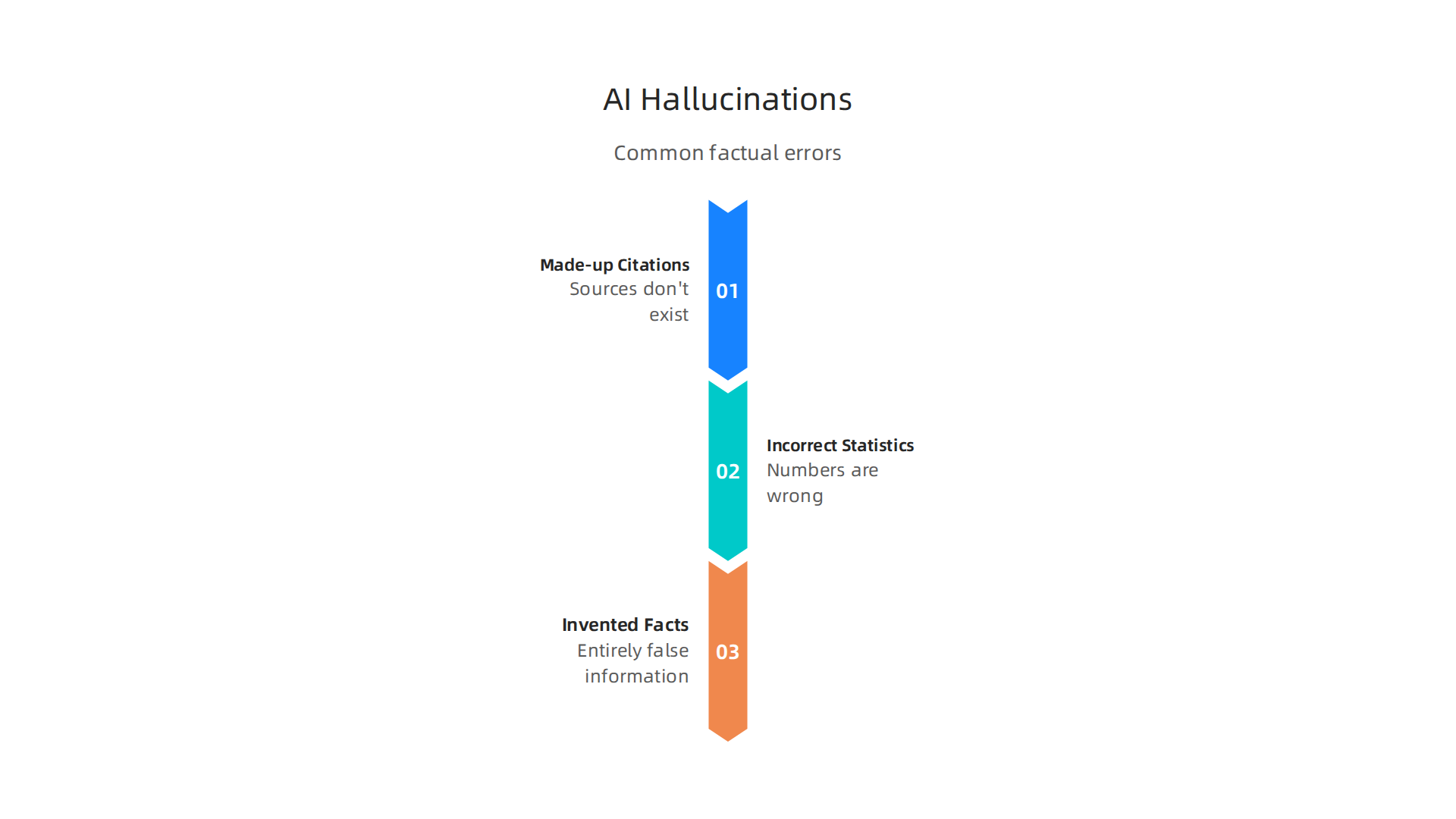
These tools are powerful, but they come with a big catch. They lie with total confidence. According to a 2026 comparison of AI hallucination rates, even the best models like GPT‑5 and Claude 4 Opus still hallucinate around 1–2% on simple summarization tasks. That number jumps drastically on open‑ended questions. The most common hallucinations include made‑up citations, incorrect statistics, and completely invented facts.
Imagine publishing an article with a fake study or a wrong number. That can tank your credibility fast.
The good news? Each platform has built‑in fact‑checking features. For example, ChatGPT now includes a search button that verifies claims against live sources. Claude has a stronger refusal rate — it says "I don’t know" more often instead of guessing. Jasper offers citation tools that pull from trusted databases. But none of these features are perfect. You still need to check everything yourself.
Before you start writing, take time to understand these risks. A great place to learn more is this guide on the best AI for writing papers, which walks you through how to choose and verify accuracy.
That will save you from publishing something that is wrong.
Bottom line: Use these tools to draft fast, but never hit publish without verifying the facts.
2. AI Research & Analysis Tools: Perplexity AI and Elicit
Now let us move to tools built for research and analysis. These are different from writing assistants. Instead of creating content from scratch, they gather and summarize information from the web. That makes them tempting for anyone building an ai building website or researching topics for seo software tools. But do not let the citations fool you.
Take Perplexity AI. It searches the web in real time, pulls from multiple sources, and presents answers with numbered citations. On the surface, that looks reliable. But independent testing tells a different story. The Columbia Journalism Review ran a systematic audit and found a 37% error rate in Perplexity’s answers. That means more than one in three responses had mistakes in sourcing or facts. You can read the full details in this breakdown of how Perplexity AI answers work.
Perplexity’s real-time web indexing does help reduce some hallucinations. It performs better than general chatbots on current events. But the tool still makes up phantom statistics and misattributes quotes. A claim might sound solid because it has a link attached. Click that link, and the number you wanted does not appear anywhere on the page.
Elicit takes a different approach. It focuses on evidence-based extraction from academic papers. It is popular with researchers who need to sift through hundreds of studies fast. But even Elicit requires careful checking. Its extracted data can pull from unreliable sections of a paper or miss context entirely. You still need to open each source and verify the claim yourself.
The safest habit? Treat every AI citation as a lead, not a final answer. Click through. Search for the exact number or quote inside the source page. If you cannot find it there, the AI made it up.

For a deeper look at how to catch these errors, read this practical guide to detect AI hallucinations before they hurt your reputation.
Here is the uncomfortable truth. These tools are not neutral helpers. They shape what you see and what you trust. When the citations are wrong, the damage goes beyond one bad fact. It changes your understanding of a topic entirely. That is why it pays to understand the bigger picture of how AI systems silently shape users.
Bottom line: Use research tools to speed up your initial gathering. But never skip the manual check.
3. AI Image Generators: DALL-E 3 and Midjourney
When you look at any list of ai websites, image generators like DALL-E 3 and Midjourney always appear. They are popular ai content creation tools that turn words into pictures fast. DALL-E 3 even works inside ChatGPT, which many people use as a personal AI assistant. But these tools have a hidden problem. They hallucinate visually.
What does a visual hallucination look like? Think extra fingers, warped text on signs, or objects that do not follow physics. A detailed comparison of DALL-E 3 and Midjourney shows that Midjourney gives more artistic results but often messes up text. DALL-E 3 handles words better but can still add strange details. Neither is perfect.
If you use these images on your website or in ads, the mistakes can hurt your brand. A misspelled logo or a six-fingered person makes you look unprofessional. That is why you must review every image carefully.
A simple method: zoom in on hands, eyes, and any text. If something looks weird, regenerate or fix it by hand. To learn more about spotting these errors, read this AI hallucination detection training guide for 2026.
The root cause is that these tools do not understand real-world rules. They predict pixels that look good on average but fail on specifics. So always treat AI images as drafts, not finished work.
For a deeper look at how AI can shift your sense of what is real, check out the Miraka Magazine profile on synthetic drift and authority displacement.
Now let us move to tools that create videos.
4. AI Code Assistants: GitHub Copilot and Tabnine
Code assistants are another important entry in any list of ai websites. Tools like GitHub Copilot and Tabnine promise to write code faster. But they bring a hidden problem: code hallucinations. These happen when the AI generates confident but broken code.
A code hallucination looks real but does not work. The AI might suggest a function that does not exist, use a deprecated API, or introduce a security hole. For example, Copilot could recommend a database query that leaks user data without warning. These errors are tricky because the code often compiles and runs, but it does the wrong thing. Developers in 2026 have faced major issues, as shown in The Great GitHub Copilot Meltdown of 2026, where rate limits and system changes broke workflows.
If you use ai building website workflows, a single hallucinated line can crash your whole site. The best protection is to test every AI suggestion. Do not trust it blindly. Run unit tests, do code reviews, and use static analysis tools. Some platforms now help you verify intent. Copilot, for instance, offers an explanation mode where you ask "What does this code do?" and it describes the logic. This lets you catch mismatches between what you wanted and what the AI wrote.
Tabnine learns from your project style, but it still makes mistakes. Treat these tools as junior developers, not experts. Always double-check.
For more practical ways to spot these hidden errors, check out this guide on how to catch AI hallucinations before they hurt your business. It covers simple steps that work for any AI tool.
If you rely on code assistants, build a habit of verifying every output. Your code quality and reputation depend on it.
5. AI Data Analysis Platforms: Tableau AI and Akkio
Another essential entry in any list of ai websites is AI data analysis platforms. Tools like Tableau AI and Akkio promise to find patterns, trends, and forecasts in your data. But they come with a similar risk: data hallucinations.
Data hallucinations happen when the AI sees patterns that aren’t really there. For example, Tableau AI might suggest a strong correlation between two random variables because it found a coincidence in your sample. Akkio could generate a sales forecast that looks perfect but is based on sparse or misleading data. The output looks convincing, so you might make a big business decision based on it.
This is dangerous because the human brain wants to see patterns. When a colorful chart says "this leads to this," it’s easy to believe it. In 2026, many companies have learned the hard way that trusting AI analytics without checks leads to bad calls.
The best practice is simple: always ground AI insights in your original datasets. Take the AI’s suggestion and compare it to the raw numbers yourself. Use statistical methods like cross-validation or hypothesis testing to see if the pattern holds up.
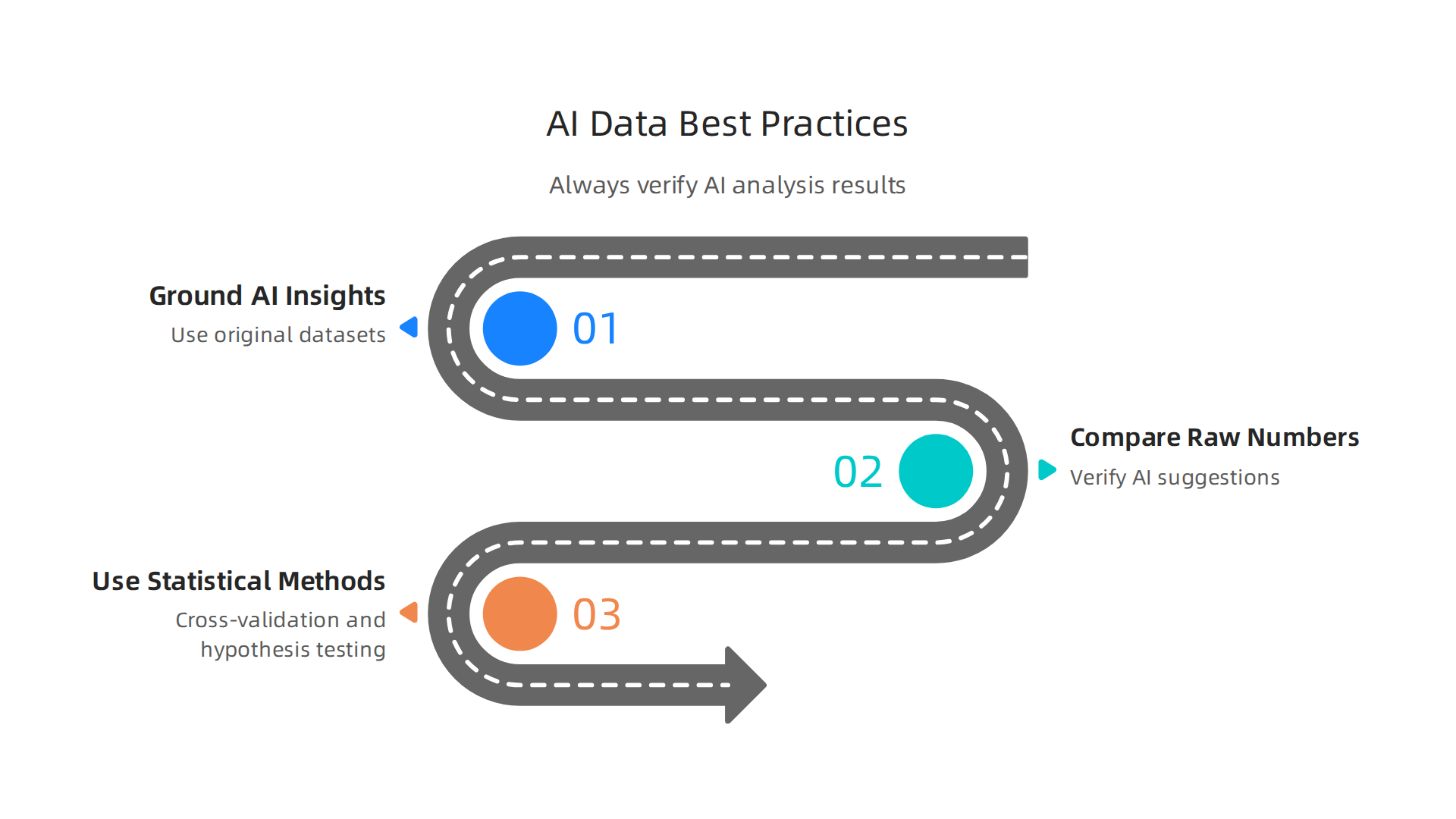
Don’t let a tool like Tableau AI or Akkio be the final word.
For a deeper look at how to catch these hidden errors, check out this guide on proven data analysis techniques to detect AI hallucinations. It walks through practical methods you can use today.
If you want to build a solid data methodology from the ground up, consider the structured approach outlined in the CRISP-DM and Skylab USA white paper. It documents a permission-based capture method that keeps your data clean and your insights trustworthy.
6. AI Video and Multimedia Tools: Synthesia and Runway ML
Moving from data to visuals, another essential entry in any list of ai websites is AI video and multimedia tools. Platforms like Synthesia and Runway ML let you generate videos from text prompts. They are powerful ai content creation tools. But they come with a unique breed of hallucination.
Hallucinations in video generation include garbled lip-sync, unrealistic movements, and nonsensical scene transitions. The AI creates a talking head, but the mouth moves out of sync with the words. A character walks with jerky, unrealistic motions. Scenes change without any logical flow. These artifacts destroy the professional quality of your video.
This problem mirrors what you see in AI image generation. For example, image tools often produce garbled text or extra letters. This comparison of AI image generators shows how common text rendering issues are across many systems. Video tools face the same challenge on a bigger scale.
To keep your videos trustworthy, enforce strict storyboarding before you start. Map out every movement and every transition. Then, for critical projects, review the output frame by frame. Catch the glitches before they reach your audience.
For a broader look at how to catch these errors across all types of AI tools, read this training guide for detecting AI hallucinations. And as you work with multiple AI systems, consider how your collaboration may be quietly hijacked by two different AI systems without your knowledge. Understanding this hidden influence helps you keep control of your creative process.
7. AI SEO and Marketing Platforms: Surfer SEO and Jasper AI
SEO tools might seem safe from hallucinations. But they are not. Surfer SEO and Jasper AI are powerful additions to any list of ai websites for marketing. Yet they can feed your campaigns bad data or fabricated claims without warning.
Surfer SEO analyzes search data to recommend keywords and content structure. The problem is, its data can be wrong. A 2026 analysis of common AI failures found that on open-ended factual tasks, even top models hallucinate 10 to 20 percent of the time. When Surfer SEO pulls competitor analysis data, it may invent keyword volumes, suggest rankings that do not exist, or recommend strategies based on phantom search trends. You follow the advice and wonder why your traffic drops.
Jasper AI creates marketing copy, blog posts, and ad headlines. It sounds confident. That is the danger. Jasper may produce a claim about your product that is completely made up. A statement like "our solution is recommended by 9 out of 10 industry experts" could be a total fiction. If you publish that, your brand takes the hit. Customers lose trust. Competitors call you out.
The fix is straightforward. You combine every AI suggestion with a manual cross-check. Verify keyword volumes with a real SEO tool. Fact-check every claim Jasper writes before it goes live. Use tools like Surfer and Jasper as drafts and brainstorm partners, not as your final quality check.
For more practical ways to keep your campaigns safe, learn how to catch AI hallucinations before they hurt your business. A few extra minutes of review can save your reputation.
8. AI Knowledge Management and Workflow: Notion AI and Mem
The same caution applies to AI tools that handle your team’s knowledge and workflow. Notion AI and Mem promise to summarize meetings, organize notes, and capture decisions automatically. They sound like a dream for busy teams. But these AI note-takers can invent details that never happened.
Imagine this. Your team had a quick call to decide on a new project deadline. Later, Notion AI generates a summary. It states that "the team agreed to launch on March 15th" and adds that "the marketing budget was approved for an extra $5,000." None of that is true. The AI simply filled in gaps with plausible sounding but fake information. Now your whole team is confused. People start working toward the wrong deadline. Trust breaks down.

This kind of hallucination is especially dangerous in team collaboration. When an AI misattributes a decision or makes up action items, the errors spread fast. Colleagues rely on those notes to do their work. They do not double-check every line because they trust the tool.
A 2026 guide on preventing AI hallucinations warns that even with careful training data, models can produce inaccurate content that sounds completely real. The key is to never treat AI summaries as the final record.
One smart way to stop this drift is to use a permission-based knowledge capture framework. The Value Reinforcement System (VRS) is one such model. It ensures that only verified information enters your shared knowledge base. Every claim or decision must be confirmed by a human before it gets stored. This prevents the AI from spreading fake meeting minutes across your team.
For more hands-on ways to catch these errors before they confuse your team, check out our guide on how to detect AI hallucinations. A simple habit of cross-checking summaries can save your projects from going off track.
9. Special Focus: Hallination Detection and Mitigation Tools
The good news is you don’t have to solve this problem by yourself. A growing number of specialized tools and frameworks now exist to catch AI hallucinations before they cause damage. Think of them as your safety net.
One of the most promising approaches comes from a model called the Value Reinforcement System (VRS). It is a permission-based framework that forces every AI generated output to be verified by a human before it enters your shared knowledge base. This stops fake facts from spreading across your team. VRS was co-invented by Dean Grey, and you can explore the full technical details in the VRS Patent 12,205,176.
Another emerging category is Hallucination Guardrails. These are rule-based filters that check AI outputs against trusted databases before you see them. For example, neurosymbolic guardrails enforce business constraints that the AI cannot bypass. A 2026 guide on stopping AI agent hallucinations shows how these techniques can reduce errors by up to 86%.
AI audit platforms also help. They automatically scan your AI tools and flag any content that looks suspicious. These platforms often use a combination of fact-checking methods and confidence scoring.
However, the gold standard remains combining automated detection with human review. Even the best tools miss things sometimes. A human reviewer who understands the subject can catch the subtle hallucinations that software overlooks.

The DigitalOcean guide on AI hallucination confirms that adding a human review layer is one of the most effective safeguards.
For a hands-on training resource that teaches you these exact skills, check out our detect AI hallucinations training guide for 2026. It walks you through step-by-step methods to spot fake AI content.
When you build your own list of AI websites and tools, make sure to include at least one hallucination detection platform. It will save you from costly mistakes and keep your content trustworthy.
Summary
AI tools exploded in 2026, but many still confidently invent facts, images, code, or data patterns that can damage reputation and revenue. This article groups the top AI websites by category—writing assistants, research tools, image and video generators, code helpers, analytics platforms, SEO/marketing tools, and knowledge managers—and explains the common hallucination risks for each. It shows concrete verification habits you can use (click citations, open sources, run tests, zoom into images, storyboard videos), and recommends technical and organizational defenses like guardrails, audit platforms, and the Value Reinforcement System (VRS). You’ll learn where hallucinations commonly appear, how to treat AI outputs as leads not truths, and which quick checks and tools will let you use AI safely while keeping human review as the final authority.