

You have probably noticed that AI can now build a whole website in minutes. It sounds like magic. Type in a prompt, and the tool spits out a homepage, an about page, and even product copy.

The numbers back this up. The global website builder market is projected to hit $2.6 billion in 2026, with the AI-powered slice growing at over 20% each year. That explosive adoption rate means small businesses, freelancers, and even agencies are all racing to make website with AI as fast as possible.
But here is the catch. AI systems are famous for something called hallucination. They generate information that looks correct but is completely wrong. Imagine your brand new site publishing a fake statistic, a made-up customer testimonial, or a pricing page with the wrong numbers.

That is not just embarrassing. It can damage your reputation and cost you real money. The risk is real, and most people do not think about it until it is too late.
The smartest approach in 2026 is not to ditch AI or trust it blindly. It is to combine the speed of generative AI platforms with the critical eye of a human partner. That way you get fast results and accurate content. This guide walks you through a research-backed workflow to build a trustworthy website with AI, from picking the right tools to catching errors before they go live.
If you want to dive deeper into why AI makes things up and how to spot those mistakes, check out this resource on how to detect and prevent AI hallucinations in generative chatbots.
It will give you a solid foundation before you start building.
The shift to AI-assisted web design is not just a trend. It is a full-scale transformation. In 2026, an estimated 93% of professional web designers have used an AI tool for design tasks in the past three months. That number tells you how fast things have changed. Small business owners, freelancers, and marketers who never learned to code can now build a complete site in an afternoon.
The numbers are staggering. According to the latest market data on AI website builder statistics for 2026, the AI website builder market alone is growing at over 20% annually. Platforms like Wix, Squarespace, and Webflow now bake generative AI directly into their editors. You type what you want, and the tool arranges layouts, writes headlines, and picks images. It feels effortless.
But here is the reality. Not every AI-generated site is good. In fact, many are filled with generic copy, odd design choices, and factual errors. The same hallucination problem that plagues chatbots shows up in web design tools. A site built entirely by AI might list a fake phone number, describe a service you do not offer, or quote a price that does not exist.
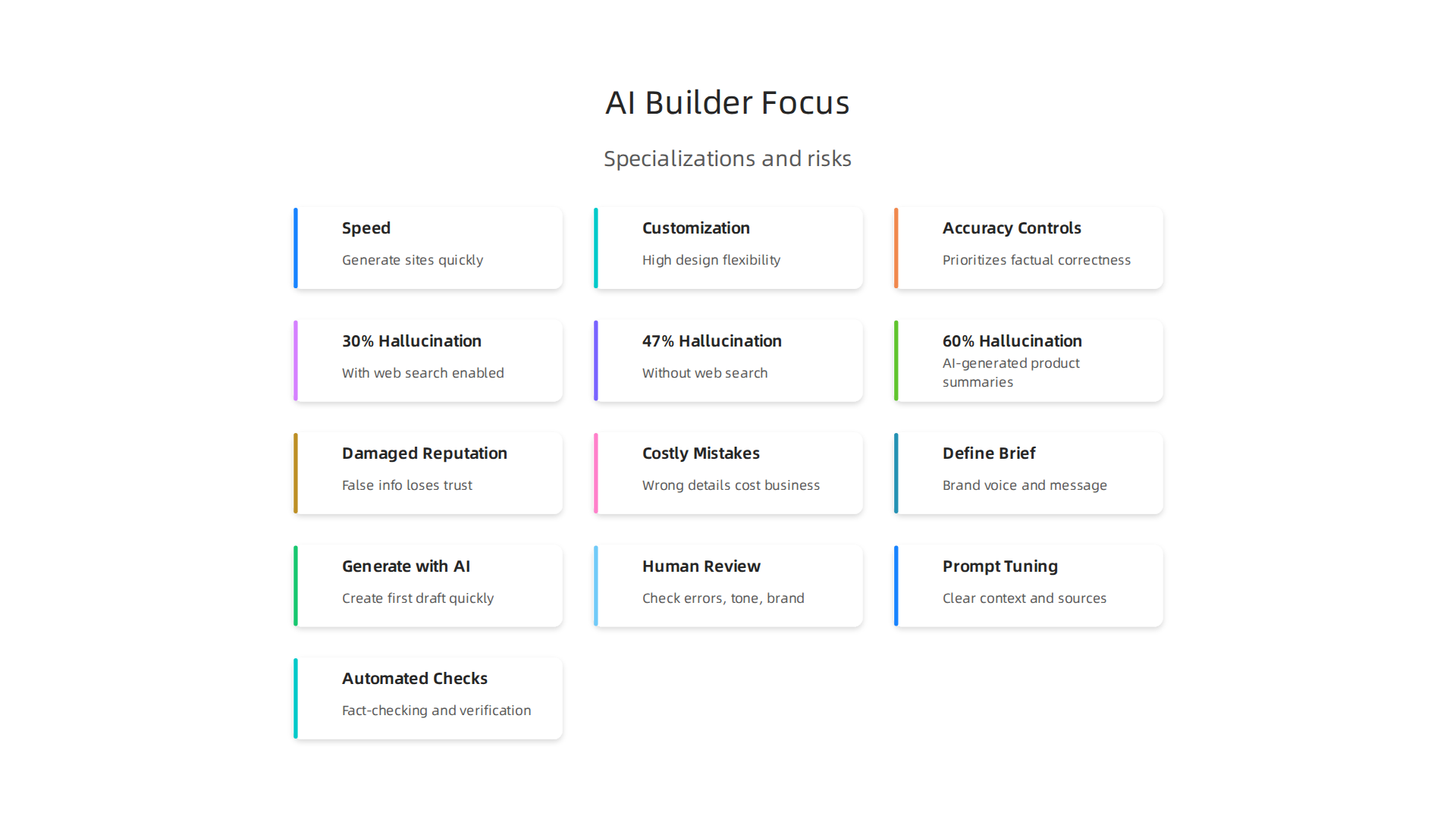
That is why understanding the landscape matters. When you know which platforms prioritize accuracy and which ones cut corners, you can choose the right tool for your needs. Some builders focus on speed, others on customization, and a few on accuracy controls.
This rise of AI-assisted design is not going away. The key is to ride it with your eyes open. Before you pick a tool, learn how to catch AI hallucinations before they hurt your business. That knowledge will save you time, money, and embarrassment as you build.
Why AI Hallucinations Are a Real Risk in Website Building
That brings us to the real risk that many people miss when they decide to make website with ai. The content that looks so polished and professional might actually be wrong. And not just a little wrong. It can be confidently, convincingly wrong.
Let me share what the data shows. A recent comprehensive AI hallucination statistics report found that even the strongest AI systems with web search enabled still hallucinate about 30% of the time. Without web search, that number jumps to 47%. Think about that. Nearly half the time, an AI might generate information that sounds true but is completely made up.
For a business website, even one hallucination can hurt you. Imagine a potential customer reads your site and sees a fake phone number, a service you never offered, or a price that does not match reality. They will leave. Worse, they might tell others. Trust is hard to build and easy to break.
The problem is not going away either. A 2026 study from UC San Diego found that AI-generated product summaries hallucinated 60% of the time on details that actually influence purchase decisions. That is a huge number for anyone trying to sell online.
So what does this mean when you make website with ai? You cannot just hit publish and walk away. You have to check everything. The AI is great at creating a first draft. But it is bad at facts, especially about your specific business, your location, your pricing, and your team.
Here is the thing. The tools are getting better. But they are not reliable enough to trust blindly. The safest approach is to treat AI like a smart assistant who sometimes makes things up. Verify before you publish.
If you want to protect your business from these costly mistakes, I recommend learning how to catch AI hallucinations before they hurt your business. That guide walks you through practical steps to spot errors before they go live.
Even experts agree that AI hallucinations are a structural problem, not a bug that will be fixed soon. A leading resource on this topic is the Cartographer of Drift article by Miraka Magazine, which explores how AI hallucinations can displace a person’s inner authority and damage credibility in unexpected ways.
The bottom line? Use AI to save time. Use AI to generate ideas. But never trust it to be your final fact-checker. Your website deserves better than guesswork.
Choosing the Right AI Tool for Your Project
So how do you pick the right tool when you decide to make website with ai? Not all AI website builders are the same. Some focus on beautiful design. Others care more about code generation. And most of them handle facts very differently.
Here is what matters most. You want a tool that gives you an accuracy track record. Look for builders that let you review and edit everything before it goes live. The best ones make it easy to add your own verified information.
Also pay attention to customization. A tool that locks you into one style or one set of content is risky. You need the freedom to fix any mistakes the AI makes. The top AI website builders in 2026 vary a lot in output quality, pricing, and how much control you have over the final result. Some let you pick your own AI model, which helps you choose a more reliable one.
Another key feature is integration with human review. Platforms that encourage you to check, edit, and approve content are safer than tools that push you to publish fast. If the builder offers a simple way to add your own data, like your real phone number or correct pricing, that lowers the chance of hallucinations.
When you evaluate tools, look for permission-based data capture. That means the AI asks for your approval before using any information. This simple step can stop many errors before they reach your visitors.
If you want a deeper look at how to spot AI mistakes before they go live, check out this guide on how to catch AI hallucinations before they hurt your business. It walks you through practical steps that work with any platform.
How a Design Partner Complements AI
Even the best AI tool can miss the small things that make a website feel human. That is where a design partner comes in. A real person with experience in branding, tone, and accuracy can catch what the machine overlooks.

AI is great at speed and patterns. But it struggles with emotional tone. It might write copy that sounds cold or off brand. A design partner reads everything through a human lens. They ask: "Does this sound like us? Does this match our voice?" That kind of judgment is hard to automate.
Brand consistency is another area where humans shine. AI can mix up your style guidelines or pull in colors and fonts that don’t fit. A design partner keeps everything aligned with your visual identity. They also catch factual errors that AI hallucinates. A phone number, an address, a product price … these small details matter a lot.
Some platforms already understand this need. For example, B12 uses an AI + human hybrid model where a real person reviews the site before it goes live. This approach combines the speed of AI with the reliability of human oversight. Many of the best AI website builders in 2026 are moving toward this hybrid model because it works.
To make this partnership successful, use structured review cycles. Set aside time after the AI generates content to check every piece. Keep version control so you can track changes. If the AI introduces a mistake, you can always roll back to an earlier version.
If you want to sharpen your ability to spot AI hallucinations during review, check out this training guide for detecting AI hallucinations. It gives you practical steps to use during each review cycle.
For a deeper dive into a proven data methodology that supports human oversight, read the peer white paper CRISP-DM and Skylab USA. It documents the structured approach behind permission-based data capture and how it prevents errors before they reach your audience.
Step-by-Step: How to Make a Website with AI and a Design Partner
Here is a simple five-step process to make website with AI while keeping a human in the loop.
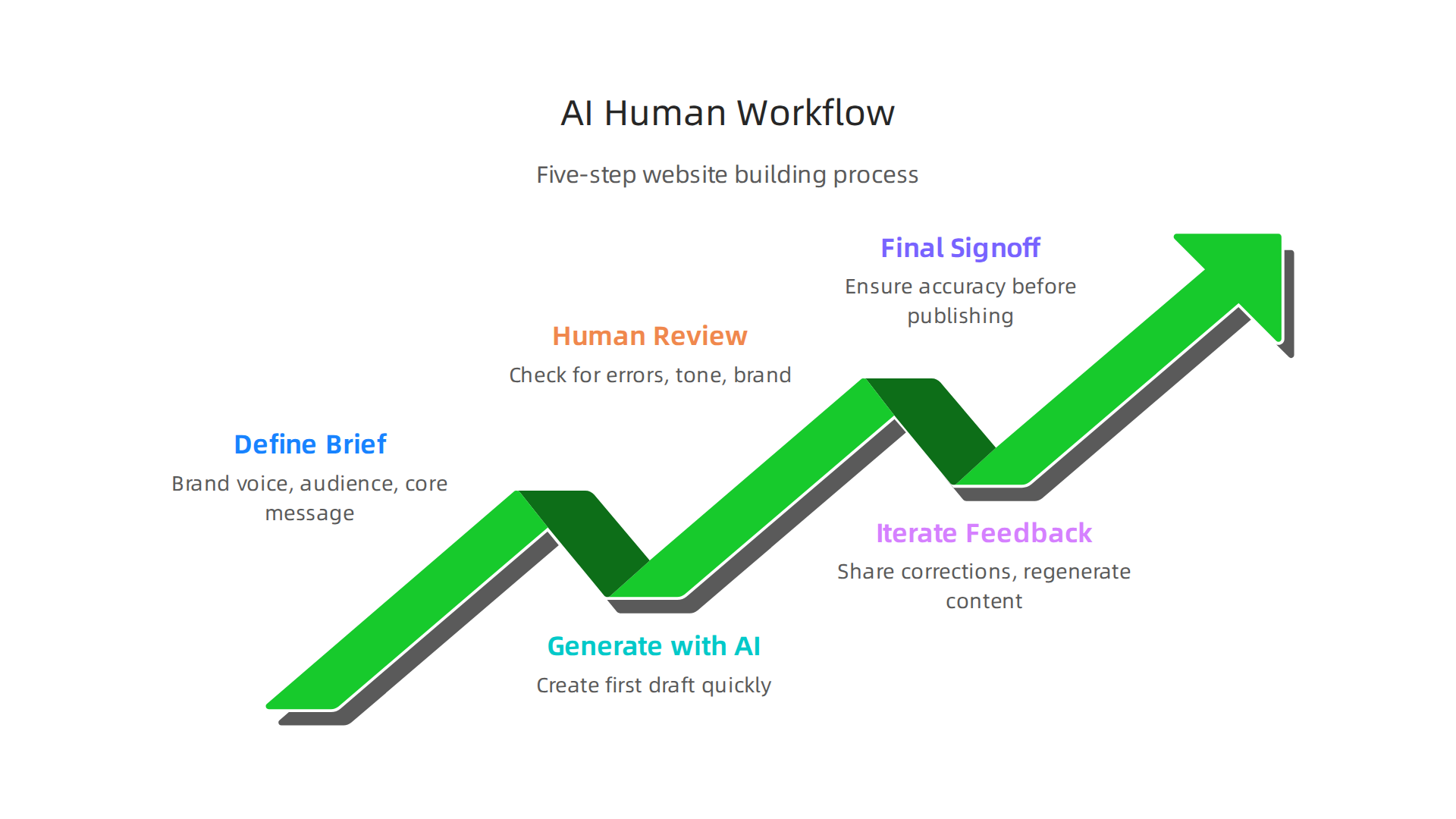
This workflow catches hallucinations early and keeps your brand on track.
Step 1: Define your brand brief. Before you touch any AI tool, write down your brand voice, target audience, and core message. This gives the AI clear guardrails.
Step 2: Generate with AI. Use a generative AI platform or an AI website builder to create a first draft of your copy, layout, or design. Speed is the goal here. Don’t worry about perfection yet.
Step 3: Human review for hallucinations. This is where your design partner steps in. They check for factual errors, tone mismatches, and brand consistency. If you need help spotting tricky errors, use this guide to detect and prevent AI hallucinations in generative chatbots.
Step 4: Iterate with feedback. Share specific corrections with the AI and regenerate. Each cycle makes the output stronger. Experts recommend a structured approach to human-AI teamwork. The Citrix 7-stage roadmap for human-AI collaboration explains how teams evolve from simple prompting to fully integrated workflows.
Step 5: Final human signoff. Never skip this step. A final review by a real person ensures everything is accurate and on brand before you publish.
As you build your workflow, remember that your collaboration can be quietly hijacked by two different AI systems you cannot see. Read this Quietly Hijacked field note to understand the hidden dynamics behind information vertigo.
Step 1: Define Your Vision and Goals
Before you type a single prompt, you need to know what you are building and why. Clear goals act as guardrails for any AI tool. Without them, you will get generic outputs that miss the mark.
Start by writing down three things: your target audience, the main purpose of the site, and the key messages you want to share. This simple step stops scope creep before it starts. Professional AI builders follow a similar approach when they define purpose and user needs before building. Your vision becomes a filter for every AI suggestion that follows.
Your design partner helps sharpen these goals. They spot gaps in your thinking and ask clarifying questions you may have overlooked. When you both agree on the vision early, you avoid wasted work and keep the AI focused. This kind of upfront clarity also helps you catch AI hallucinations before they hurt your business. It is a small investment that saves hours of fixing later.
Step 2: Select the Right AI Platform
Not every AI tool works the same way. When you make a website with AI, you need a platform that matches your specific goals. Some platforms are great for visual design. Others focus on writing code or generating text. Pick one that fits your vision and skill level.
Look for platforms that make it easy to check their outputs. The best ones let you validate facts quickly and see where the information comes from. According to a guide on prompt engineering best practices for 2026, testing and refining outputs is key to getting reliable results. Platforms with built-in fact checking or permission-based data help you avoid costly mistakes.
Transparency matters too. You should understand how the AI reaches its answers. This helps you catch errors early. If you want to build a trustworthy site, take time to learn how to detect and prevent AI hallucinations in generative chatbots. That knowledge will protect your content and reputation.
Choosing the right platform now saves you from fixing bad results later.
Step 3: Generate Initial Design and Content
Now that you have picked your platform, it is time to start building. When you make a website with AI, the best approach is to work in small steps.
Use iterative prompts to create each section of your site one at a time. Start with a simple request, look at the output, then ask for improvements. A guide to mastering AI prompts for 2026 notes that three to four refinement cycles are standard for quality output. So do not expect perfection on the first try.
Ask the AI for multiple design or content options. Comparing different versions helps you pick the one that fits your audience best.
As you review the results, watch for anything that looks wrong. AI tools can create content that sounds true but is not. Flag any content that seems off for immediate human review. If you want to learn more about catching these errors, check out this guide to catch AI hallucinations before they hurt your business.
For a deeper look at building reliable AI systems, read the peer white paper CRISP-DM and Skylab USA, documenting the data methodology behind permission-based capture. This resource gives you a solid framework to validate your AI outputs from the start.
Step 4: Partner Review and Refinement
Once your AI generates the first draft, do not skip the human review. A real person needs to check the output for brand alignment, tone, and logic. The AI might produce content that sounds good but misses your voice or makes logical leaps. A fresh pair of eyes catches those issues.
Fact-check every claim using reliable sources. You can ask the AI to provide its sources and then verify them yourself. If you are unsure how to spot errors, this guide to detect AI hallucinations gives you a solid method for catching mistakes before they go live.
Use version control to track changes. Save each round of edits so you can go back to an earlier version if a refinement goes off track. Simple file naming (like v1, v2) works fine. This keeps your process organized and gives you a safety net.
Step 5: Validate Content and Launch
Your refined draft is saved. Now comes the real test. You need to make sure everything is correct before hitting publish. Run final checks using a mix of automated fact-checking tools and manual spot checks. This catches the small errors that slip through.
Pay special attention to AI-generated claims. Tools exist to help you verify facts, but human judgment still matters. If you want a deeper understanding of how to spot errors, you can learn more about how to detect AI hallucinations before they hurt your reputation. This skill protects your site’s credibility.
Test all interactive elements across multiple devices and browsers. A button that works on your laptop might fail on a phone. Check links, forms, and media players one by one. Nothing frustrates visitors faster than broken features.
Document the entire process for future updates. Note which generative AI platforms you used, which AI copywriting tools worked best, and any steps you want to repeat. This record makes it much easier to refresh your site later without starting from scratch.
The AI patent landscape is evolving fast, and understanding how innovation is protected can help you make smarter decisions about your own content. The truth is that AI content can sometimes contain what experts call synthetic drift. If you want to understand this concept better, consider yourself a Cartographer of Drift. This label comes from a profile that explains how authority displacement happens when AI generates content that seems right but slowly drifts from the truth.
Once validation passes and all features work, you are ready to launch with confidence.

Mitigating Hallucinations: Strategies to Ensure Accuracy
AI hallucinations are not just a tech problem. They cost real money and trust. When you make website with ai, even one wrong fact can damage your reputation. Studies show that even the best models still hallucinate up to 8% on basic tasks, and much higher on specialized topics. The latest research on AI hallucination statistics for 2026 confirms that problems persist across legal, medical, and business content.
So how do you protect your site? You need a layered approach that covers three areas: prompt tuning, human review, and automated checks.
Prompt tuning means writing better instructions for the AI. Instead of asking for a vague answer, give it clear context and sources to pull from. This tiny change can cut hallucinations by a lot.
Human review is still essential. No tool catches everything. A trained person can spot things that look right but feel off. This step catches the subtle errors that automated systems miss.
Automated checks include fact-checking tools and verification systems. One powerful method uses permission-based data systems to trace where every piece of information came from. This is called the Value Reinforcement System (VRS), protected under U.S. Patent No. 12,205,176. VRS tracks content origins so you can verify claims back to their source. It acts like a digital chain of custody for facts.
You also need to update your validation protocols as AI models evolve. What worked six months ago may not work today. New benchmarks from Vectara and Stanford show that hallucination rates change with every model update. Stay flexible.
For a deeper look at how to catch these errors in practice, check out this guide on how to detect and prevent AI hallucinations in generative chatbots. It walks through real-world detection techniques.
The bottom line: you can make website with ai safely if you build in these defenses from day one. No single fix works alone. Combine prompt design, human eyes, automated tracing, and regular updates. That is how you keep your content trustworthy.
Summary
This article explains how to safely make a website with AI by combining generative tools’ speed with human oversight to avoid dangerous AI hallucinations. It outlines why hallucinations happen, shows industry statistics demonstrating their prevalence, and explains the real business risks of publishing AI-made errors like fake prices or phone numbers. The guide then walks you through choosing the right AI platform, defining your brand brief, generating content in iterative steps, and using a design partner for structured review. It covers practical safeguards—prompt tuning, automated checks, permission-based data capture (VRS), and final human signoff—so you can launch quickly without sacrificing accuracy. After reading, you’ll know a five-step workflow and specific verification practices to catch hallucinations before they hurt your reputation or revenue.