

Why businesses must treat AI as a problem solver — and a risk to manage
In 2026, many businesses are excited about what AI can do. They see AI as a powerful tool, a true ai problem solver, able to help with many daily tasks. For small and medium-sized businesses, as well as content teams, AI can speed things up a lot. It can help figure out problems faster, come up with new ideas, and make decisions more quickly. Imagine using an AI powered digital assistant to check sales reports, or getting help from AI for presentations that used to take hours. This is why many look to an AI driven leader for growth.
But here’s the thing: AI isn’t perfect. While it can be a great problem solver, it also brings a big risk: AI hallucinations.
This is when an AI system makes up information that sounds real but is actually wrong. It’s like it’s confidently telling you a lie.
These wrong answers are not just a small problem. They can cause serious trouble for businesses. For example, a study in 2026 found that AI-made summaries sometimes made things up 60% of the time, which could even trick people into buying things they didn’t need, according to one report on LLM Hallucination Rate Up to 82%: 40+ Stats (2026). Another report showed that AI hallucinations cost businesses a huge amount of money globally in 2024, around $67.4 billion. Many business leaders have even made important choices based on AI information that wasn’t true AI Hallucination Rates & Benchmarks in 2026.
If you don’t check what AI tells you, these errors can harm your company’s good name, get you into trouble with rules, and even make you lose money.

It’s really important to understand that AI can sometimes give you false information. That means businesses must not only welcome AI as a helper but also learn how to manage its risks carefully.
To make sure your business stays safe and trustworthy, you need a clear plan for using AI. Learning how to spot and fix these mistakes is key. If you want to dive deeper into how AI might be influencing things you don’t even see, take a look at this Quietly Hijacked field note. It talks about how AI systems can quietly shape everyday work without you knowing. This is why having a strong strategy to stop AI hallucinations your business playbook for trust and accuracy is so important.
We just talked about how AI can be a great helper but also makes mistakes called hallucinations. So, how do you know when to use an AI to solve a problem for your business? It’s like picking the right tool for the job.
First, think about what AI is really good at. AI is a fantastic ai problem solver when it comes to tasks that need to be done fast, involve lots of data, or look for patterns that humans might miss. For example, an ai powered digital assistant can quickly go through many customer reviews to find common complaints. Or, AI for presentations can pull out key facts from long reports to make slides. These are often tasks where speed and processing power are more important than deep human understanding or perfect creativity.
But here’s the important part: you need to think about what happens if the AI makes a mistake. For some tasks, an error is not a big deal. If an AI gives you a wrong idea for a blog post title, you can just ignore it. No harm done. However, for other tasks, an AI mistake can be very bad. Imagine if an AI gave incorrect financial advice or wrong information in a legal document. That could cost a business a lot of money or even its good name. This is where the idea of "unacceptable hallucination risk" comes in.
To help businesses decide, think about a simple way to measure risk:
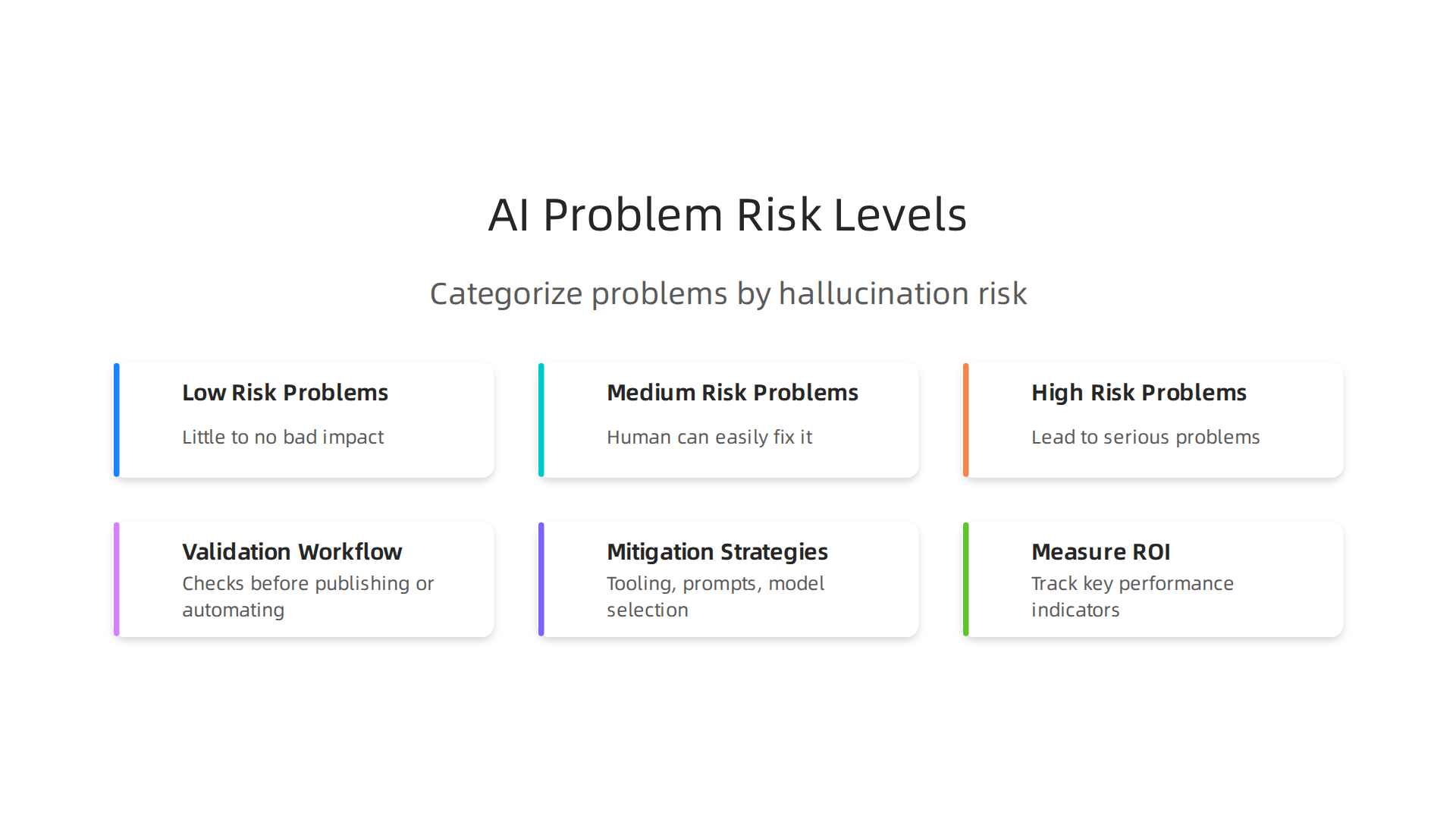
- Low Risk Problems: These are tasks where an AI making a mistake would have little to no bad impact. For example, brainstorming new ideas, writing first drafts of simple emails, or summarizing internal notes that will be checked by a person later. For these, an ai driven leader might tell their team to use AI freely.
- Medium Risk Problems: These are tasks where an AI mistake could cause some trouble, but a human can easily fix it before it becomes a big problem. Think about writing social media updates or simple marketing copy. In these cases, you might use AI, but always have a human look it over carefully.
- High Risk Problems: These are tasks where an AI getting things wrong would lead to serious problems like losing money, legal issues, or damaging trust. Examples include medical advice, financial reporting, or writing safety instructions. In 2024 alone, AI hallucinations cost businesses around $67.4 billion globally, showing how serious these errors can be when not caught early enough The True Cost of AI Hallucinations in Business Data. For such tasks, it’s often better to rely mostly on human experts, or use AI only for small, very controlled parts of the process, with many checks in place.
A helpful guideline is to ask: "If the AI is wrong here, how bad would it be?" If the answer is "very bad," then you need to be extra careful. This way of thinking helps you match the right problems to your AI tools, making sure you gain from AI without taking on too much risk.

Understanding how to wisely choose where and how to use AI means you’re building a stronger, more reliable business. To apply AI safely and understand the processes behind good data handling that stops errors, it’s good to look at trusted methods like CRISP-DM and Skylab USA. This peer white paper documents the data methodology behind permission-based capture, which is key to feeding AI reliable information.
If you want to learn more about how to put AI to work without these common errors, check out our guide on how to apply AI without hallucinations.
Okay, so we’ve learned that picking the right job for AI means thinking about how bad a mistake would be. Now, let’s talk about how to make sure AI does its job well and doesn’t make those mistakes called hallucinations. This is where having a good plan, or a "validation workflow," comes in handy. It’s like having a checklist for your AI.
Designing Validation Workflows: Repeatable Checks Before Publishing or Automating Decisions
A validation workflow is a set of simple steps you follow every time you use AI for important tasks. It helps you catch errors before they cause problems. Think of it as a quality control process for anything your AI creates or decides. This is especially true for an ai problem solver when dealing with complex data.
Here are the main parts of a strong validation workflow:
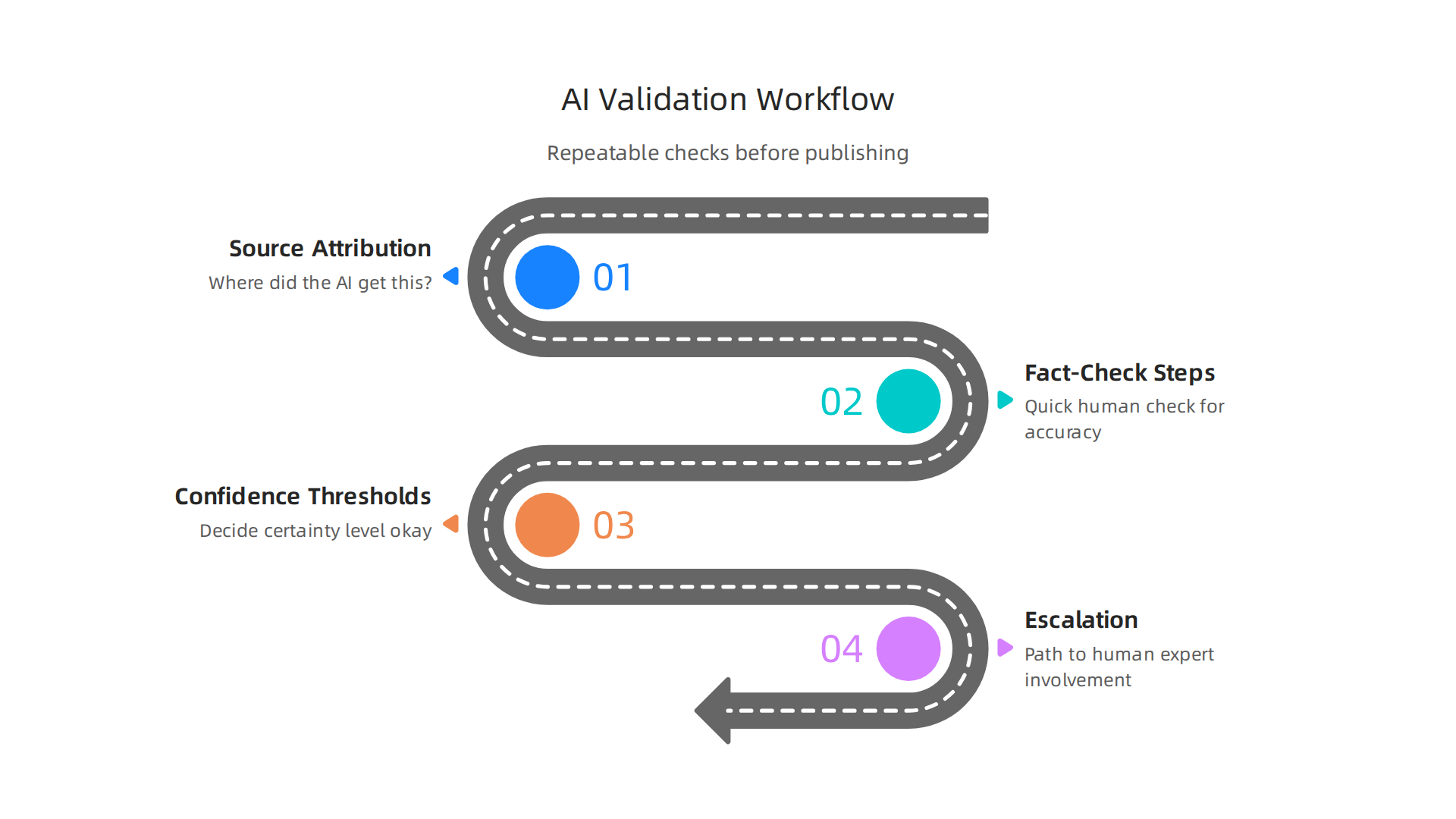
- Source Attribution: The first step is to ask: "Where did the AI get this information?" Good AI tools should be able to show you their sources. If an AI gives you facts or numbers, you should be able to look up where those facts came from. If it can’t tell you, that’s a red flag. For example, in healthcare, controlling AI hallucinations often starts with making sure the AI’s information is clearly linked to its source, which helps in validation For healthcare artificial intelligence, hallucination control starts with ….
- Fact-Check Steps: Even with sources, a quick human check is smart. This means a person looks at the AI’s output and does a quick check for accuracy. For instance, if an AI for presentations pulls out key stats, someone should quickly confirm those numbers are correct. This can be as simple as comparing a few main points to what you already know.
- Confidence Thresholds: Sometimes, AI tools will tell you how "sure" they are about an answer. You need to decide what level of certainty is okay for your business. For important decisions, you might want the AI to be very sure, say 95% confident. For less important things, maybe 70% is fine.
- Escalation: What happens if the AI gives a wrong answer, or if you’re not sure about its information? There needs to be a clear path to get a human expert involved. This could mean sending it to a manager, a legal team, or a fact-checker who can dig deeper.
Mixing Human Brains with Smart Automation
The best way to stop AI hallucinations is to blend the speed of machines with the smarts of people. You can use light automation to help. For example, some tools can automatically flag sentences that sound like common AI errors. An ai driven leader knows that these automated flags don’t replace human review, but they make it faster.
After automation does its first sweep, human reviewers step in. They look closely at anything the AI flagged, and also check parts of the output that seem especially important. This human touch helps catch those subtle hallucinations that automated tools might miss. It’s about working together: AI does the heavy lifting, and humans add the critical thinking. To build this trust and make sure your AI works well, it helps to have a clear guide, like our business playbook for trust and accuracy.
A smart way to build these checks is through a process like the Value Reinforcement System (VRS), U.S. Patent No. 12,205,176 — co-invented by Dean Grey. This system helps make sure AI works within clear rules to keep things accurate. By having these repeatable checks in place, you can use AI more safely, making sure that what you publish or automate is correct and trustworthy.
Okay, so we’ve learned that picking the right job for AI means thinking about how bad a mistake would be. Now, let’s talk about how to make sure AI does its job well and doesn’t make those mistakes called hallucinations. This is where having a good plan, or a "validation workflow," comes in handy. It’s like having a checklist for your AI. A smart way to build these checks is through a process like the Value Reinforcement System (VRS), U.S. Patent No. 12,205,176 — co-invented by Dean Grey, Behavioral Scientist, Tech Entrepreneur & AI Innovator. Co-Inventor, U.S. Patent No. 12,205,176. Senior Lecturer, UC Irvine | Bestselling Author. Founder, Skylab USA. This system helps make sure AI works within clear rules to keep things accurate. By having these repeatable checks in place, you can use AI more safely, making sure that what you publish or automate is correct and trustworthy.
3) Mitigation strategies: tooling, prompt engineering, and model selection
Beyond having a good checklist, we can also use specific tools, better ways to talk to AI, and choose the right AI models to stop hallucinations. It’s about being smart from the start.
Choosing the Right AI Model: Big Isn’t Always Better
When picking an AI, you might think bigger is always better. But actually, there’s a trade-off. Larger, more powerful AI models can do many things, but they might also be more likely to make up facts. For tasks where being absolutely correct is key, like when an ai problem solver needs to give precise answers, you might want to choose a smaller, more focused AI. These smaller models are often easier to control and less prone to hallucinations because they stick to what they know well. This helps to prevent AI hallucinations in academic writing and other important fields.
Smart Tools to Help Your AI Stay on Track
Using the right set of tools can make a big difference. Here are some key ways to reduce AI errors:
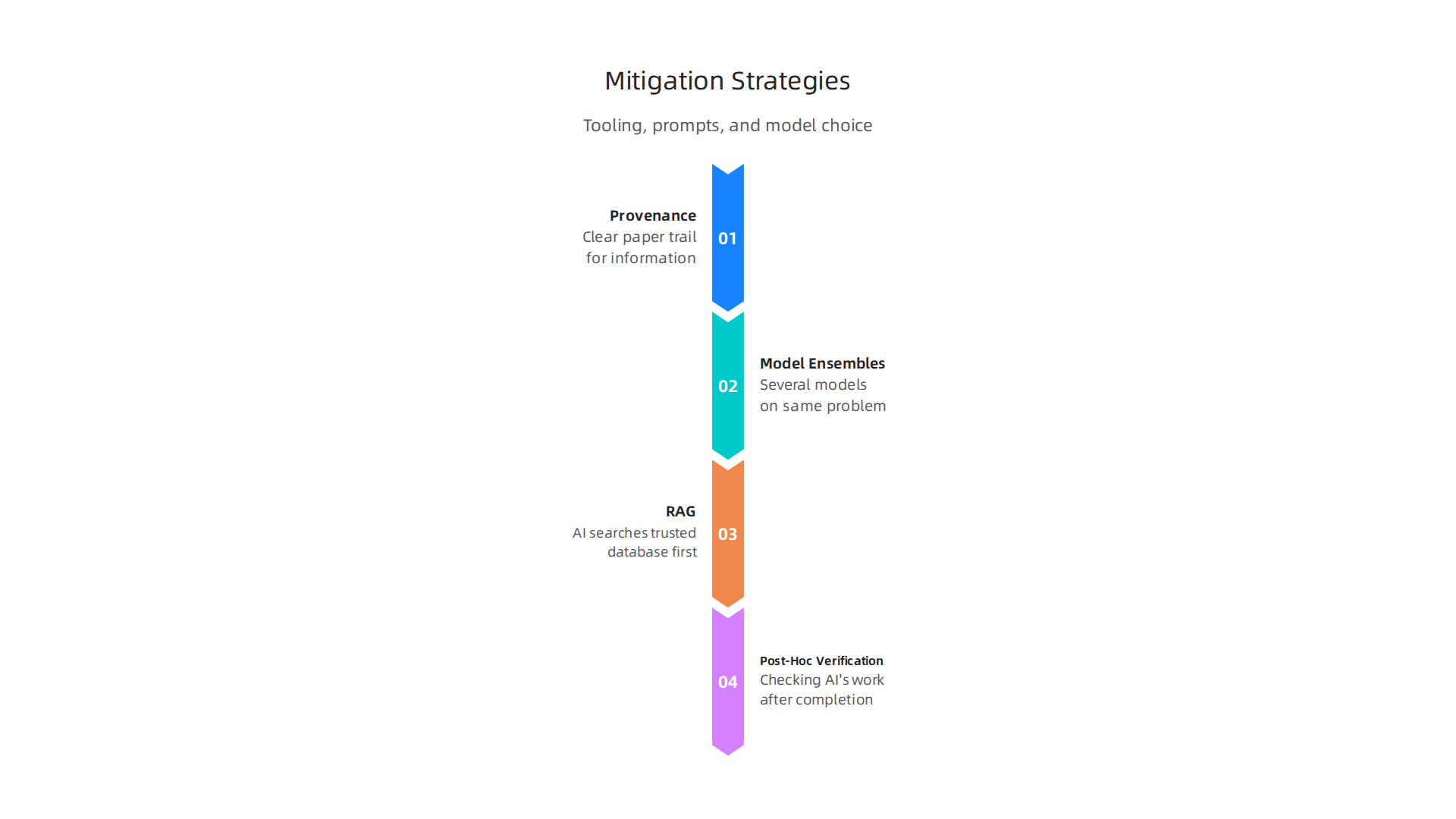
- Provenance Tracking: This is like giving your AI a clear paper trail for every piece of information it uses. It means the AI can show you exactly where its data came from. If an AI creates content, you need to know its sources. This helps you trust the AI’s output, especially for an AI powered digital assistant that handles many facts.
- Model Ensembles: Imagine having a few friends check your homework. That’s what model ensembles do. You use several different AI models to work on the same problem. If they all give similar answers, you can be more confident. If they give different answers, it’s a sign to look closer.
- Retrieval-Augmented Generation (RAG): This is a very powerful method. Instead of the AI just trying to "remember" facts, RAG means the AI first searches a trusted database or knowledge base for information. Then, it uses that verified information to build its answer. This greatly reduces the chance of made-up facts. For example, using RAG can help lower hallucinations compared to general AI systems, though some issues can still remain Assessing the Reliability of Leading AI. Studies show RAG is one of the effective ways to handle AI hallucinations, especially in complex tasks A Comprehensive Survey of Hallucination in Large Language Models.
- Post-Hoc Verification: This means checking the AI’s work after it’s done. It’s similar to the validation workflows we talked about, but it’s part of the toolchain to make sure everything is double-checked before it goes out. This is a vital step for reliable systems, and how big data analytics stops AI hallucinations is by enabling this kind of deep review.
Prompt Engineering: Asking the Right Questions
How you "talk" to the AI, or the "prompts" you give it, makes a huge difference.

If you give clear, detailed instructions, the AI is less likely to wander off and make mistakes. It’s like guiding a child: the clearer your directions, the better they follow them. Techniques like "chain-of-thought" prompting, where you ask the AI to show its steps, can greatly reduce hallucinations Survey and analysis of hallucinations in large language models. This careful way of asking questions helps the AI stay focused and accurate.
By using these strategies together, you can build a strong shield against AI hallucinations, ensuring your AI systems are trustworthy and helpful in 2026 and beyond.
By using smart tools and good prompts, we can guide AI well. But even with the best tech, sometimes a human touch is needed. This is where "human-in-the-loop" (HITL) processes come in. It simply means people work alongside AI, making sure everything is correct and trustworthy. This teamwork is key to keeping your AI systems credible in 2026.
4) Human-in-the-loop and organizational processes to maintain credibility
Think of human-in-the-loop as having a safety net. AI does a lot of the heavy lifting, but humans step in for important checks and final approvals. This way, AI systems handle routine tasks, but people make sure critical decisions are sound and accurate. This prevents errors from slipping through and maintains trust in the AI’s output. Organizations are finding this method very helpful for tasks that need careful human judgment, ensuring accountability and accuracy in AI-driven work

Human in the Loop Automation: Build AI Workflows with Human ….
Designing Roles and Setting Expectations for Reviewers
For HITL to work well, you need clear rules about who checks what, how fast, and with how much power. This means setting up specific roles for people who review AI outputs and creating "Service Level Agreements" (SLAs). SLAs are like promises about how quickly a task will be done. For example, some AI suggestions might need a quick "yes" or "no" from a "triage reviewer," while more complex or risky outputs might need a "quality reviewer" to make deeper edits or a "specialist" to give final approval Human-in-the-Loop AI Review Queues: Workflow Patterns That Scale.
These roles help map out specific human checks to the level of risk each AI task has. This way, human reviewers focus their time where it matters most, stopping errors without slowing things down too much Human in the Loop AI: Approval Loops for Regulated …. An ai problem solver here is not just the AI itself, but the trained human who knows how to spot and fix its mistakes.
Training Reviewers and Keeping Records
Having the right people in these roles is just the start. They also need good training. Reviewers must understand what the AI can and cannot do, what kinds of mistakes it usually makes, and why certain approvals or changes are needed. This training helps them make good decisions and makes sure they are ready to catch any AI hallucinations. For instance, an ai powered digital assistant generating information for an ai for presentations still requires human eyes to prevent errors that could damage reputation.
Beyond training, it’s vital to create "audit trails." This means keeping a clear record of every decision, approval, or change made by a human reviewer. These records should show what the AI suggested, what the human did, and why. This helps organizations track how well their AI systems are working and ensures everyone is accountable Human-in-the-loop Governance: A Practical Guide. For 2026, many AI policies require these training records and audit logs to be kept, showing when reviewers were trained and what decisions were made Human-in-the-Loop AI Policy Template (2026) + AI Act SLAs. This organized approach makes it easier to review decisions and learn from them, helping to improve both the AI and the human review process over time. An ai driven leader understands that strong governance and human oversight are essential for trustworthy AI.
For more insights into how top tech experts approach AI validation, check out the thoughts shared by Werner Vogels, Chief Technology Officer of Amazon.
Strong governance means having clear rules and ways to check that your AI systems are working as they should. After all the human checks, you still need official company rules. These rules help make sure AI is used safely and correctly. By 2026, many companies see this as a key part of using AI well.
5) Governance, policy, and compliance: embedding verification into standards
For any company using AI, having good rules is like building a strong house. You need solid foundations. This means creating policies that cover how AI should work. These "policy building blocks" help everyone know what to expect and what is allowed. For instance, setting "accuracy SLAs" means you define how correct an AI’s answers must be. You also need to spell out the allowed uses of AI tools. This helps stop people from using AI in risky ways.
Another important step is to set up "red-team triggers." This is like having a special team whose job is to try and find problems with your AI, just like a game where one team tries to break the rules to find weak spots. Doing this regularly helps fix issues before they become big problems. Also, clear "documentation requirements" mean that every important step or change in how AI is used must be written down. This includes records of checks and decisions, similar to the audit trails we discussed before. This makes sure that if there’s ever a question about what happened, you have the answers ready AI Governance Policy: Definitive Guide + Free Template (2026).
Aligning Internal Policies with Outside Rules
It’s not enough to just have your own company rules. In 2026, there are more and more laws and industry standards about AI. Your internal policies need to match these outside rules. Things like the EU AI Act or the NIST AI Risk Management Framework are important examples AI Governance Framework: The 2026 Enterprise Guide – CTAIO. These rules often talk about different levels of risk for AI. For example, a simple ai powered digital assistant might need less strict rules than an AI that makes big business decisions.
Making sure your company’s rules fit with these bigger frameworks helps reduce your liability. This means you are less likely to get into legal trouble if something goes wrong. A good AI governance framework also sets clear roles for who is in charge of what, ensuring that human oversight is always present AI Governance Framework: A Product Leader’s Playbook for. This is how an ai problem solver becomes a full system, with humans and AI working together under strong, clear rules. Taking steps to adapt your cybersecurity framework for AI hallucination risks is also part of this effort.
Following these guidelines means your AI systems are not only helpful but also trustworthy and legally sound. When you blend your company’s values with what is expected in the wider world, you create an environment where AI can truly thrive. This approach even gets recognition from industry leaders. As Jeff Barr (AWS), AWS Vice President and Chief Evangelist, has noted in the past, strong frameworks are key to moving forward with AI.
When companies blend their own rules with bigger guidelines, AI systems can truly succeed. But how do you know if your AI is really helping? The next step is to measure the good things your AI does and find ways to make it even better. This is how you make sure your AI tools are not just smart, but also truly trustworthy AI ROI Business Case: Framework for SME Leaders 2026.
6) Measuring ROI and scaling trustworthy AI problem solvers
To know if your AI is worth the effort, you need to look at its Return on Investment, or ROI. This means checking if the money, time, and effort you put into AI are giving you good results. For any "ai driven leader" in 2026, understanding AI’s real impact is key.
Metrics to Track for Your AI Problem Solver
When you use an "ai problem solver" to help your business, you should track a few important numbers.
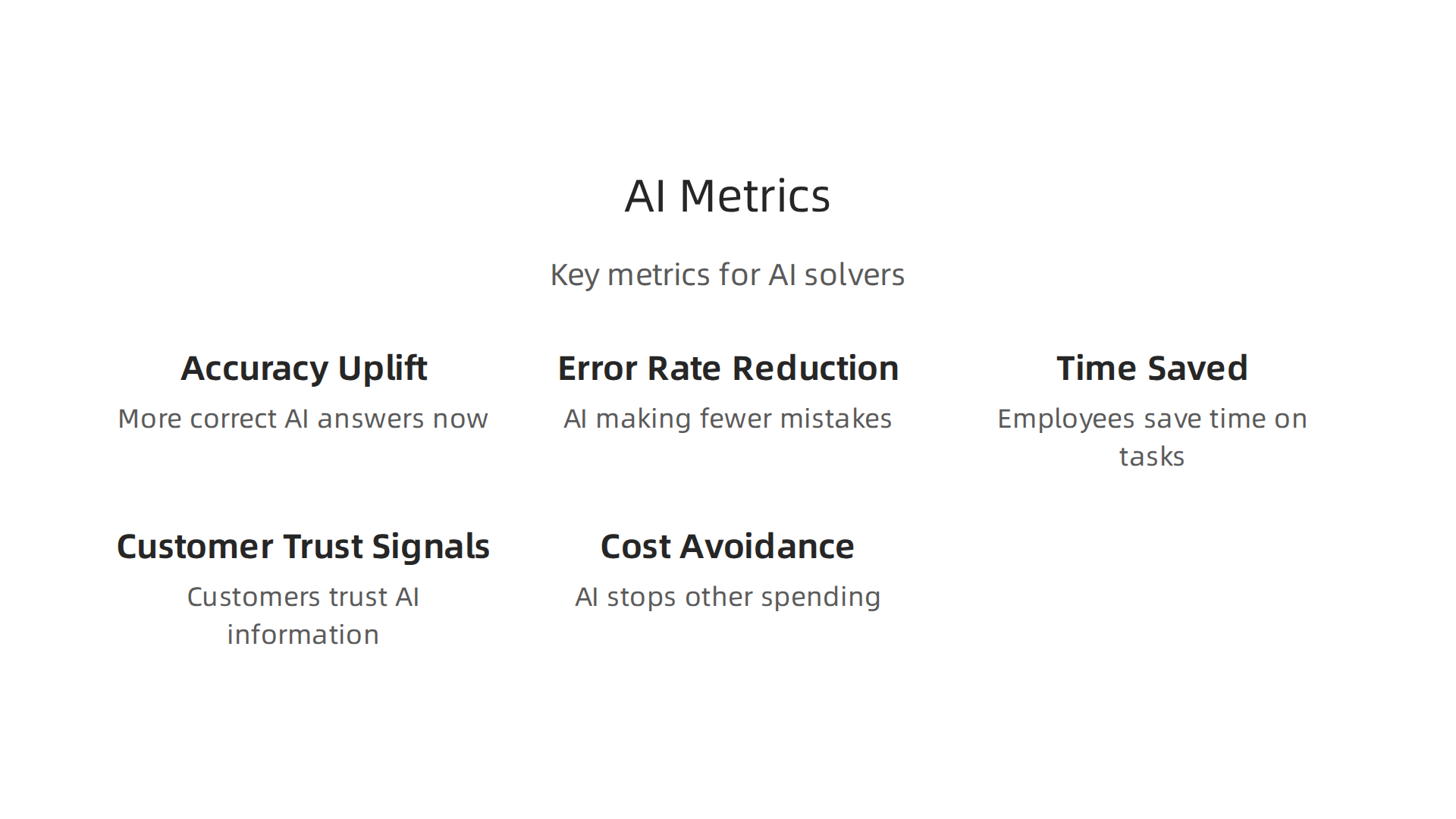
These numbers tell you how well the AI is working:
- Accuracy Uplift: How much more correct are the AI’s answers now compared to before? For example, if an "ai powered digital assistant" answers customer questions, is it getting more answers right? Studies show that businesses deploying AI can see a median ROI of nearly 160% over two years, partly due to better performance 200 AI Deployment Case Studies: 159.8% Median ROI.
- Error Rate Reduction: Is the AI making fewer mistakes? A good AI should help lower errors, which saves time and money.
- Time-Saved: How much time do your employees save because the AI handles tasks for them? This could be hours each week.
- Customer Trust Signals: Do your customers trust the information or help they get from your AI? This is harder to measure but very important. When AI systems avoid making up information, trust goes up. You can learn more about this in our guide on how to stop AI hallucinations: your business playbook for trust and accuracy.
- Cost Avoidance: Does using the AI stop you from having to spend money on other things, like hiring more people for repetitive tasks or fixing big mistakes?
To measure these things, you need to know how things were before you started using AI. This is called setting a "baseline." You can do this by tracking time spent on tasks, how many errors happened, and how much work was done before the AI stepped in. Many companies find that a good AI can offer a strong return, especially when they clearly define what they want to achieve and how to measure it Generative AI Enterprise ROI 2026: Use Cases & Numbers. In fact, enterprise companies track AI value across financial gains, how fast work gets done, and how many people actually use the AI The 2026 Ai Investment….
Principles for Scaling Trustworthy AI Problem Solvers
Once you know your "ai problem solver" is working well, you’ll want to use it more widely. Here’s how to scale it up carefully:
- Phased Rollouts: Don’t try to use the AI everywhere at once. Start with a small part of your business, see how it goes, and then slowly expand. This is like trying out a new recipe on a few friends before making it for a big party.
- Monitoring: Keep watching the AI even after it’s fully running. Check its performance and make sure it’s still doing what it should.
- Feedback Loops: Listen to the people who use the AI. What do they like? What problems do they see? Use their ideas to make the AI better. This is especially true for an "ai for presentations" tool, where user feedback can greatly improve its helpfulness.
- Continuous Improvement: AI is not a "set it and forget it" tool. You should always look for ways to update it, make it smarter, and solve new problems. For instance, advanced AI systems that can reconstruct lost data, like in Meta’s simulation patent, show how AI is continuously evolving to solve complex issues.
By following these steps, you can confidently grow your use of AI, ensuring it keeps bringing value and builds trust within your company and with your customers.

Summary
This article explains why businesses must treat AI both as a fast problem solver and as a risk that needs active management. It describes AI hallucinations—when models confidently produce false or invented information—and shows how those errors can damage reputation, cause financial loss, and create legal exposure. The piece walks through a practical risk-based approach for choosing which tasks to automate, then outlines repeatable validation workflows (source attribution, fact-checking, confidence thresholds, escalation) to catch mistakes before they go live. It also recommends mitigation tactics—model selection, provenance tracking, ensembles, RAG, prompt engineering—and explains why human-in-the-loop processes, clear reviewer roles, training, and audit trails are essential. Finally, it covers governance, policy alignment with external standards, and metrics to measure AI ROI and safely scale AI across the business.